Showing posts with label internet. Show all posts

Wednesday, February 16, 2011

How to Protect Your Web Server From Hackers.?

 http://www.hackingtrick.com/wp-content/uploads/2010/10/computer-hackers-300x236.jpg

 http://www.port80software.com/images/S_diag_servermask.gif

 http://www.lisisoft.com/imglisi2/1/6/16861-real-hide-ip.jpg

Good Evening Friends.....
I know creating a website is not simply about putting some pages and information online.
Ensuring the security of your website is a bigger and highly crucial task.
Most websites these days have a dedicated web server that gives them the leverage to grow and develop further. Basically the websites with a high volume of web traffic, a heavy database and complex application specifications require an exclusive web server. It is extremely important to hack proof your web server in order to protect your website and business.
There are a great number of hackers out there in the web world who are looking for opportunities to exploit your web server and cause serious damage. These hackers look to deface the websites with malicious content, use the scripts on the server to send out spam or phish out the personal sensitive information of the website users. Such attacks also attempt to tamper with parameters and gain access to confidential files or cross-site scripting or cookie poisoning to alter the customer data. These kinds of invasions can prove to be fatal for e-commerce and finance based websites. To prevent your web server from falling prey to such web attacks, here are some important recommendations and anti hacking tips.You need to follow a two-pronged approach to safeguard your web server from any hackers.
The first layer is a firewall that exists to block any unwarranted unused Internet ports. A good firewall will use a rule based access system to allow only the legitimate users to enter and filter out as well as obstruct any malicious traffic from accessing the server. Also create strong passwords that use a combination of characters, numbers and special characters in order to keep the password hackers at bay.
The second element is to put in place an intrusion protection service. This is a more sophisticated approach to deal with hackers wherein you stop the illegitimate entry of users at the source itself. If a firewall works on the front line, an intrusion protection system works on the back end to deal with the enemies. This involves putting all the compromised hosts in the quarantine section and letting the genuine users move through efficiently. But setting up such an anti-hacking arrangement is only the first step. The hackers are moving fast and ahead with newer techniques to break into and sabotage the web servers. So, you need to continually update and monitor the filters, blacklists and all other aspects.

Friday, February 11, 2011

Watch Cricket World Cup 2011 Live | online cricket match

Watch Cricket World Cup 2011 Live
IN INDIA CRICKET IS VERY POPULAR, AND IT IS MY FAVORITE GAME.

ICC Cricket World Cup 2011,starts on 19th Feb 2010. 14 countries are participating in ICC Cricket World Cup 2011. The Cricket World Cup 2011 final will be played on Apr 2 at Wankhede Stadium, Mumbai.

ICC Cricket World Cup 2011 Group A Teams – Australia, Sri Lanka, Zimbabwe,Pakistan, New Zealand,  Canada and Kenya.
ICC Cricket World Cup 2011 Group B Teams – India, England, Bangladesh, South Africa, West Indies, Netherlands and Ireland.

There are many websites from where you can watch world cup cricket live streaming online for free.Check the below lists of websites
Crictime.com One of the most trusted website to watch cricket online for free. Serves many live streaming for world cup 2011 matches.
http://www.ustream.tv/discovery/live/sports-cricket World cup cricket on the net
Justin.tv Search for the appropriate channel to watch ICC world cup 2011 live online for free.
Freedocast.com: You can search here for ICC world cup 2011 live matches online. There are number of live streaming channels available to watch world cup 2011 live online for free.
Webcric.com: Just like the above two websites, it provides many live streaming channels to watch world cup 2011 cricket matches online
enjoy cricket........

Thursday, February 10, 2011

how to open blocked sites

every time in college, school and in organizations access denied message  appears when we open a blocked site.....
it really sucks!!!!
but every problem have a solution, so for this a solution is here....

1. Go to Google
2.Type transparent free proxy address free
3.Click on the transparent proxy fresh transparent proxy list
4.Look for a proxy address with port 8080
5.Now go to tools menu of internet explorer
6.Go to internet options
7.connections tab
8.click Activate use a proxy server for ur LAN options
9.Put that number that you found in the website with 8080 port and hit Ok
10.Again Ok Now open any websites.

Tuesday, February 1, 2011

what is alexa rank and how to improve alexa ranking

Alexa is a web company that collects data on websites and publishes the ranking of website...


Where do they get there data from?

They have several million users that use the Alexa toolbar. The toolbar sends data back to Alexa each time a user visits a website. Several million users sounds impressive which has led many to put a lot of credibility to the Alexa rankings, but is it really that credible? No its not. The several million users are
biased population.
They tend to be more technologically savvy than the average web user (only those who are technologically savvy will likely download and install the toolbar), so the Alexa results will be heavily biased toward the web site that the technologically savvy tend to visit. Also anyone with a website can install the toolbar (and get a few buddies to do the same thing) and visit their own website several times a day, just to inflate the Alexa ranking of their own website!

Increase Alexa Ranking


I’ve summarized the 6 strategies that I’ve discovered and applied to my own website to increase my Alexa ranking. Apply these strategies to your own website and see your ranking climb towards the top.

1.Download Alexa toolbar free use it every day to visit your own website. Alexa even gives you the ability to co-brand the toolbar with your own logo and give it away. You can download the toolbar here: http://pages.alexa.com/prod_serv/associatetoolbar.html

2. Encourage your website visitors to add their positive testimonials on Alexa’s detailed listings page for your website. This can be done by placing a link to the appropriate Alexa page on your website and asking visitors to “Click here to rate this website”.

3. Write your own site reviews on the top 100 rated Alexa sites and include your redirect URL. The top 500 domains, according to Alexa can be found at http://www.alexa.com/site/ds/top_500 When you write a review, be sure to use the redirection URL we discussed in number 2 above specifically for your website

4. Download the Alexa ranking button, traffic history graph, info links, and other traffic counters onto the page of your website that receives the most traffic.

5. Get listed on as many search engines as possible by placing a free listing in DMOZ. This is the largest human edited directory on the web and is co-branded among hundreds of thousands of sites. Be patient though, it often takes up to 5 months before you see your website listed after submission. Even though it takes longer than it should, you have little say in the matter because it’s so widely used across the Internet.

6. Write content related to webmasters. This is because most of the webmasters use Alexa toolbar. You may write and post articles related to SEO, webmaster tools. Webmasters always look for new tools and may revisit your website to gain access to the tools. Promote your articles on webmaster forums and social networking sites.

7. Write about Alexa and post in your blog. Bloggers love to know about different ways of increasing their Alexa rank. This may eventually increase traffic and your rank.

Wednesday, January 26, 2011

KEYLOGGER | HOW KEYLOGGER WORKS

hackers001.blogspot.com
keystroke logging (often called key-logging) is the action of tracking (or logging) the keys struck on a keyboard, typically in a covert manner so that the person using the keyboard is unaware that their actions are being monitored.

How Keyloggers Work

The way keyloggers work varies enormously. However, there are two main types of keyloggers.

External Keyloggers (hardware):

They can be connected directly to the keyboard's cable. The spy does not need actual access to the computer nor to turn it on, he just needs to be physically there. Anyone with access to your computer may install such devices secretly and it's very hard to notice them. The main downside is that the spy can be caught if anyone finds out, for he needs to be physically there to both install and retrieve the keylogger. However, if successfully installed, this keylogger won't be detected by any antivirus your computer may have. It will log every single keystroke and save it to its enormous database where everything you type, including passwords and credit card numbers shall be later viewed.

Internal Keyloggers (software):

The most common type of keyloggers. If anyone has physical access to your computer, then it's a "piece of cake" to install a keylogger with a CD. That's the easier way, for if he is knowledgeable, he can also disable a given antivirus for that keylogger . Remote keylogging is very popular despite the numerous anti-virus programs out there that block them. There are many programs that do not only send you a report of the keystrokes, but they do it in real-time. A spy can see exactly what his victim is typing as he or she is doing it. More advanced keyloggers such as SubSeven may go as far as being able to turn on a person's microphone, control his or her mouse and even shut down the computer - just as if the spy were the one in front of it.

Remote Keylogger - Monitor ANY computer through the Internet!


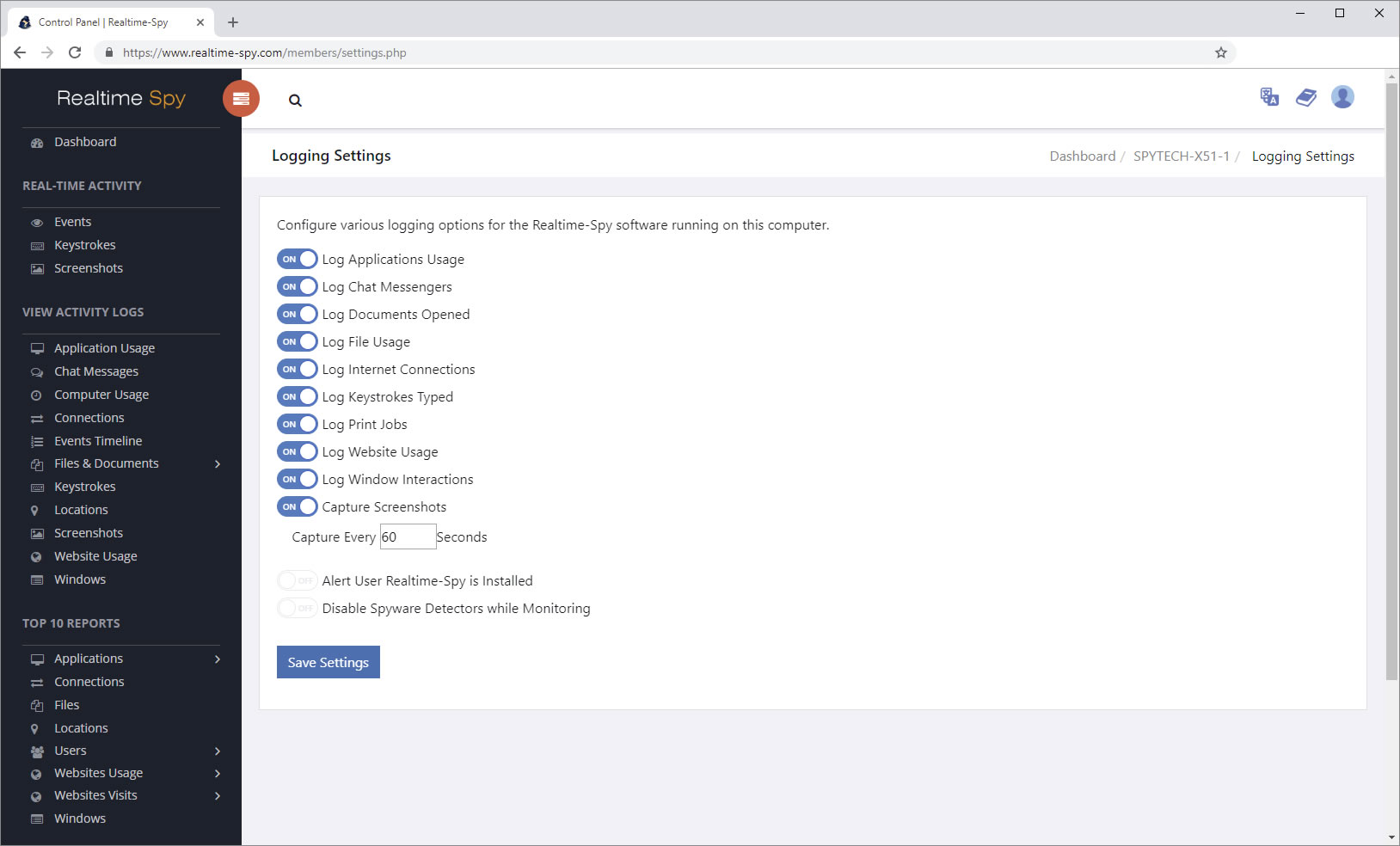
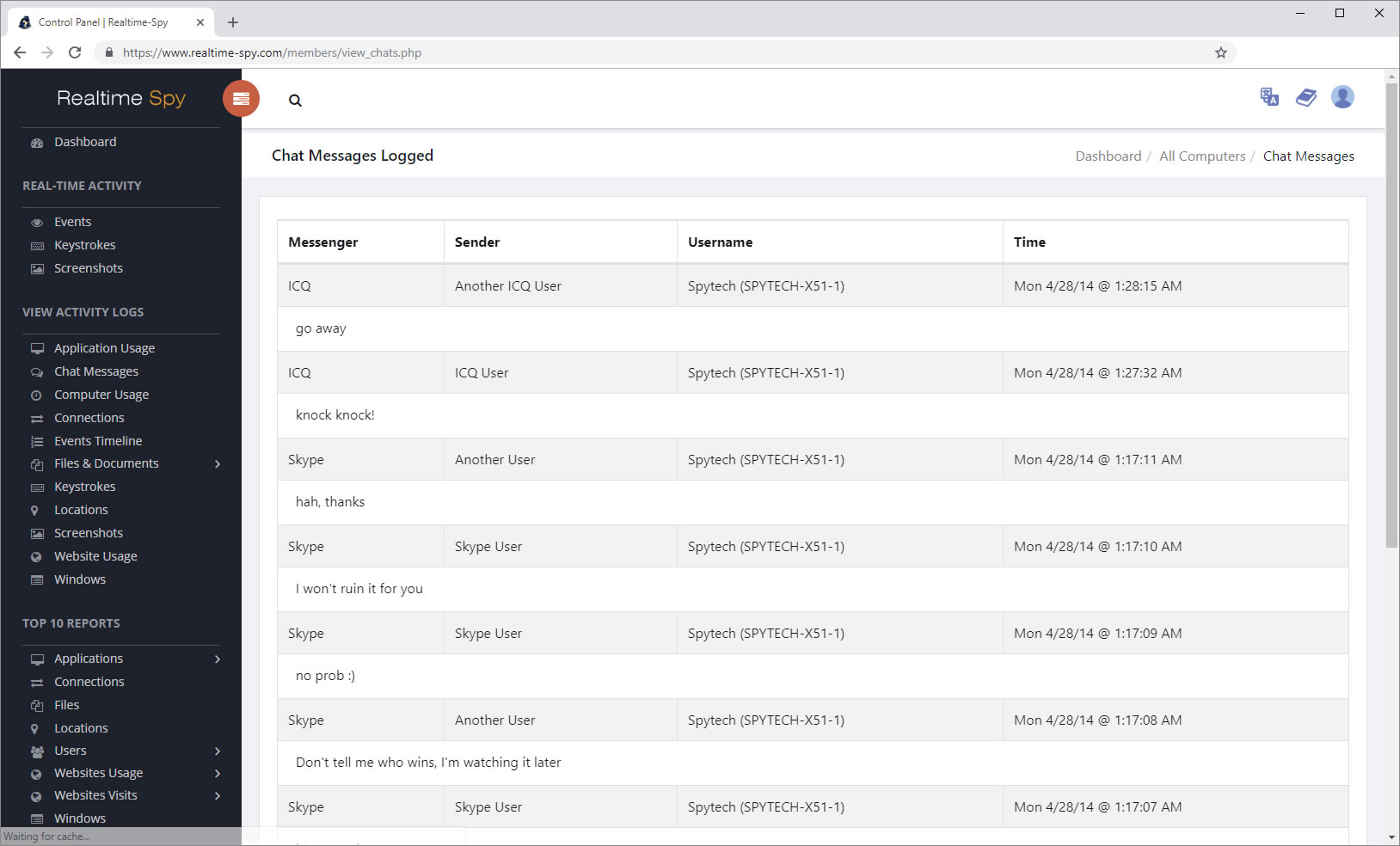
RealTime Spy offers users the ability to remotely monitor a computer via a web browser, without even having physical access to the PC. It will allows you to remotely install the monitoring system through an email attachment without the PC user recognizing the installation! And you can access the activity logs from anywhere via you favorite web browser!
No remembering long IP addresses or directly connecting to the remote PC - all you need to do is point your browser to the Remote Keylogger website to view logs of any machines you deploy Remote Keylogger on! All logs are password protected and securely stored for your eyes only - and no worrying about waiting for the remote machine to sign-on to retrieve its IP address to monitor it.
Keylogger Software Full


Main Features:

Remote Keylogger Records...
  • Online Conversations

  • Keystrokes typed

  • Website Visits

  • Applications Ran

  • Documents Viewed

  • Windows opened

  • System Login Activity

  • Key Features...
  • Remotely Installable/Uninstallable!

  • Monitor a PC from Anywhere

  • Secure online log storage

  • Monitor from anywhere

  • Check logs at any time

  • Remote log deleting

  • Log search

  • How Remote Keylogger works

    • Remote Keylogger comes with a configuration program that allows you to create a remote install module that you e-mail to the remote PC you wish to monitor. You must attach this file you create to an email, and then send it to the remote PC. From there the user must download and run the attached file to install Remote Keylogger. You can choose to enable or disable the 'alert user' option that Remote Keylogger has. Once the user runs the file, their activities will be stored on our servers, so you can view them from any location - securely, of course. To aid the install process, you can give any name to the install module you create - such as CoolPictures.exe or FunGame.exe (it must always end with the .exe extension to run).

    • Some e-mail systems may block executable attachments - do not worry, however, as this can be avoided. To bypass executable blocking by the remote e-mail server, you can drag and drop the Remote Spy module into a WORDPAD or Microsoft Works document. From there you can email this doc file with the embedded executable to the remote user - if they open the doc, and double click the executable - then Remote Keylogger will be installed. Zipping the file with software like Winzip also works.

    • If the remote user does not download the Remote Keylogger module and run it, then the software will not work - you will have to physically install the software. We are not responsible for getting the user to execute the logging module that you send them, nor will refunds be granted if they refuse to run it - as you can still physically install the software.


    Wednesday, January 12, 2011

    secret tricks to make blog popular

    today my friend ask me how can i make my blog popular!!!!

    then i just smiled and said read the today's damn post!!!
    every webmaster or blogger want to make blog popular....

    so here is some secret tricks to make it popular....

    1)Add Your Blog to Blog Communities
    Blog communities are really popular for blogs. There are tons of other bloggers and web enthusiasts constantly checking out these communities for blogs and information. There are many communities you can deal with but it’s better to stick with the ones which are popular and have a decent Google PR.
    Some good ones would be Blogged, FuelmyBlog, MyBlogLog, BlogCatalog, NetworkedBlogs etc. Try to Google and you will find a lot.
    When you follow a blog, you are basically increasing your visibility in the community. A lot of people will check you out and also subscribe to your blog if you are good. Always try to participate in a network and engage in conversations.

    2)Be a Guest Author on Popular Blogs
    Most blogs you will come across these days accept guest posts. Popular blogs like problogger, shoemoney, johnchow just to name a few; they give all the new bloggers some space on their blog to get noticed. Now this is a great opportunity and shouldn’t be missed. You can’t just post anything you like but it should be related to the niche and you have to prove your worth.
    Writing guest posts is a truly amazing way to get noticed and drive traffic to your blog. Of course you don’t get paid for it unless you are a big shot but this is a great and a free way to get traffic.
    To start with, you are most welcome to make a guest post on this site :)

    3)Give Something to Download for Free
    I love free stuffs and so do you. A good way to gain readers and make your blog popular is to give free stuffs to the public. It can be almost anything; an eBook, a wordpress theme, some popular tools or even free online class.

    how to increase speed of internet

    ARE YOU SUCKING FROM LOW INTERNET SPEED!!!!
    NOW SOLUTION IS HERE JUST FOLLOW THE SIMPLE STEPS THEN GOT HIGH SPEED.....
    Here are a few tips to Increase the Speed of Your Internet Connection

    (1) Connecting Port

    This may seem obvious, but you should connect to the internet though an ethernet port, rather than a serial, parallel or USB port. If ethernet is not an option, it may be advisable to update your hardware.

    (2) Enough RAM

    Make sure your system memory can handle the load! If you want to browse fast, you will need to close other applications in case your RAM is maxed out.

    (3) Fast Browser

    I ALWAYS USE MOZILLA, IT IS MY FAVOURITE BROWSER.
    Mozilla based browsers generally are among the fastest browsers, while still being comfortable to use. Whichever open source browser you pick, make sure you don’t overload it with extensions or addons, those will just slow your browser down dramatically. On the other hand, if speed and RAM are not an issue, go for the luxury!

    (4) Increase Speed under Windows XP Pro

    Windows XP Professional reserves 20% of your bandwidth for services like updates or spyware checks. If you would like to exploit this reserve, do the following:
      If you want to tap into this locked speed then make the following changes:
      1. Go to Start-> Run-> and type gpedit.msc
      2. Expand the Administrative Templates branch
      3. Expand the Network tab
      4. Highlight QoS Packet Scheduler
      5. Click on Limit Reservable Bandwidth and check the enabled box
      6. Then Change the Bandwidth limit % to 0 %
      Once you have done this click apply and restart your PC. After rebooting you should see a noticeable improvement in your net speed.

      (5) Tweak Tools

      There are a number of programs that promise to increase your internet speed. They may work, they may not. They all apply a number of changes to optimize your network settings. Whether or not they will really improve your internet speed or which one will work the best for you greatly depends on your system, hence it’s difficult to recommend an application.
      For further reading I will refer you to a set of articles found on About.com. Start with DSL and Cable Broadband Speed Tweaks and work your way through the links at the bottom.
      Which tools and tweaks worked best for you?
       

      Monday, January 10, 2011

      Download Opera 11 for Windows and Linux

      hello friends The final version of Opera 11 just came out with many new features and enhancements. Improved address bar, Mouse gestures, Tab grouping, Pinned tab, Automatic updates are few of the most noticeable features in the new Opera 11.


      One more important feature is its ability to run on external devices. While installing the browser you can select to install it on external devices. Which makes it a portable browser and you can carry it in your Pen Drive with you. Just click on the options button while installing and select install for external device in the next screen.


      You can read more about the new features of Opera 11 over here.
      Or just
      you can download it directly from here

      Download Opera 11 for Windows (7.1 MB)

      or Download Opera 11 for Linux

      Wednesday, January 5, 2011

      how to make your blog popular

      Blogging TipsThe success of your blog mostly depends on the amount of traffic it gets. This is especially more important if you want your blog to generate some kind of revenue. i will tell you some points how to make your blog popular for SEO


      •  Start a controversy. Just remember not to cross the line.
      • Start a contest. Make sure to end it too.
      • Give away free goodies. People love them.
      • Write about other bloggers to interest their visitors to read your blog. Keep it positive.
      • Dress up your blog often (By dress-up I mean tweaking the design)
      • Interview other bloggers and post the interview.
      • Write about your personal life sometimes.
      • Ask questions to your visitors.
      • Share some secrets.
      • Celebrate your birthday with your visitors. Think of innovative ways for doing this.
      • Celebrate your blog’s birthday too.
      • Write something funny or disgusting. (Don’t make it a habit)
      • Make a bumper sticker with your blog’s name and stick it on your car. (Just make sure you drive often)
      • Write an e-book and distribute it to your visitors for free.
      • Introduce a commission based affiliate program.
      • Tell your visitors about your latest fad or obsession.
      • Post interesting pictures of your pets.
      • Congratulate the top commentators occasionally.
      • Encourage sharing of opinions.
      • Donate for a cause or become a volunteer for a non-profit organization. Ask your visitors to join you.
      • Put your blog’s ad in the local newspaper or the yellow pages.
      • Hold blog competitions.
      • Create polls.
      • Hold an auction and let people bid for something useful (For example, advertising space on your blog).
      • Write about your blog achievements.
      • Share your hopes and aspirations about your blog.
      • Start an award distribution system.
      • Make contact with your local visitors and hold a get-together or a bloggers’ meet.
      • Start a blog comic strip.
      • Dig up some old article that you wrote on your blog which became famous and start a discussion.
      • Try and get a photograph clicked with a real celebrity and post it on your blog. (Hold on Tiger..don’t rush to that Photoshop button!)
      • Post videos that will help your visitors learn something new. Also submit them to video sharing websites like YouTube.com.
      • Write about your hobbies and interests. (For example, if you like cooking, post a new recipe)
      • Post about one of the weirdest thing that you ever did.
      • Get featured in a print magazine.
      • Buy a paid review from any famous blogger(s).
      • Brand your blog with a catch phrase along with a logo.
      • Distribute T-shirts or merchandise with your blog name on it.
      • Join Yahoo! Answers and put a link on your website to your answers.
      • Keep a track of websites that pick up your articles or press releases. Offer them exclusive news or content.
      • Start a newsletter.
      • Podcasting is another good way to make your blog popular.
      • Publicize your blog to your friends and relatives and let them do some work for you.
      • Be active in Social Bookmarking websites.
      • Share Link Love and you will get it back.
      • People like to read about Web 2.0. Write about it.
      • Write about something that’s already famous.
      • Last but not the least, be yourself.

      Friday, December 31, 2010

      Microsoft Becoming a Failure: 12 Brand Mistakes with High Costs

      hello friends
      happy new year to all
      Analysts continue to criticize Microsoft and consider its prospects as cloud computing and competitive products dim the prospects for the company’s operating systems.
      A History of Failed Brands
      Indeed, Microsoft has a long track record of failed brands. Here are a dozen examples:
      Vista: This failure hurt the most. Microsoft is synonymous with operating systems, so a failed product in this category was a body blow. Released in January 2007, by April 2009, the software had only achieved a 24% share of PC operating systems. Most people still prefer to limp along using decade-old systems.
      Kin Phone: It took years and billions of dollars to develop, but only sold 503 units after 48 days on the market. In terms of financial cost, this brand inflicted plenty of damage.
      Tablet PC: The failure of this brand chipped away at Microsoft’s reputation as an innovator.  Ground-breaking when Microsoft first announced it ten years ago, the Tablet PC was surpassed by better design and better marketing of the iPad and Samsung’s Android.

      Zune: An innovative reputation can’t be won with copycat products. Microsoft’s Zune portable media player has not been able to effectively compete with Apple and its iPod.
      MSN: As Microsoft struggled with MSN Search, which became MSN (with the butterfly), then Live Search and now Bing, Google started, grew, and now dominates.
      WebTV: The internet over television sounded like the holy grail of convergence. But the product never produced a revenue stream as its tech-averse customer base created an expensive customer service nightmare.
      Passport: Microsoft demonstrated branding cluelessness by originally calling this “thing”  Microsoft Wallet, then Passport, then .NET Passport, then Microsoft Passport Network, then Live ID, then Windows Live as part of MSN. Phew! Moreover, entrusting sensitive information to a company known for operating systems with massive security bugs, Passport was a no-go. The service closed August 2009.
      Encarta: Why pay for a limited and outdated encyclopedia when there is Wikipedia? This brand finally expired on March, 2009.
      Bob: Bob was meant to be a user-friendly Windows interface, but turned into a laughing-stock that perennially makes the “worst of” lists. “Bob” appears to be an internal project name that somehow escaped as a public-facing brand name on an embarrassing product.
      Money: Brand trust issues aside, Microsoft Money could not compete against online banks, free personal finance tools and more established and robust financial software products.
      WinCE: Yup, this product made people “wince”. This personal digital assistant software brand represents years of trying, failing and eventually giving up.
      “I’m a PC”: In answer to Apple’s successful “I’m a Mac” branding campaign came the inexplicable “I’m a PC” answer from Microsoft. In addition to adopting an “I know you are, but what am I” brand positioning, the campaign didn’t identify the brand Windows beyond a logo and said nothing about the “V-Word” (the failing Vista operating system). Why invest in advertising a generic like a PC?
      Key Factors in Microsoft’s Branding Failures
      1)      Poor design:  Apple’s brand is built on excellent, innovative design. Microsoft design is generic and old-fashioned.
      2)      Inconsistency: The Apple product brands all support key brand attributes of the parent company: coolness and easy usability. Microsoft branding is all over the map, with some product brands having almost no association with the parent company and with no brands sharing a unifying attribute that would bring them all together as Microsoft.
      3)      No jumping off point: Apple has always been about devices integrated with software, making it easy to create new products of all kinds. Microsoft was just an operating system, and a bug-ridden one at that.
      4)      Problems with trust: Microsoft has been seen as arrogant and pushy. Its reputation has never recovered from the anti-trust lawsuit in the 1990s.
      5)      Poor follow-through: Beyond a launch announcement and a few ads, many Microsoft products flounder unsupported.
      Lots of money and really smart people are Microsoft strengths, but the company cannot reach its full potential without smarter branding. Little by little, newcomers like Google and old competitors like Apple will eat their lunch.

      Thursday, December 30, 2010

      Earn Money Online For Free With Paisalive

      Well its been a long time since I have written a article on how to Earn money Online because I could not found a genuine method that actually works .Today I glady introduce you to a new online money making trick.Well you cannot earn full time income but still you can earn enough to pay your telephone bills,canteen bills etc
      This doesn’t require any investment on your part as it is completely free to join.All it requires is at-most 15-20 minutes of your daily time

      click here to join it


      • You will get Rs 99 Instantly Once you have
      • Earn Rs 5 for verifying your mobile number.
      • You can make Rs. 2 (Rs. 50 for the first 2 referrals) per referral.
      • You can earn upto Rs 5 for each PaisaLive email you check.
      • You can make Rs 1 everyday just by just logging into your account.
      • You can earn upto Rs. 2500, for Special campaigns in a single action.
      • You’ll get the pay once in 15 days and Cheque is the only mode of payment.
      • The minimum Payout criteria is Rs 500.

      1. Once registered your account will automatically credited with Rs 99
      2. Now you will have to complete their free and easy offers to earn from them.It will take only a minute or two to complete a offer.You can expect 10 to 20 offers everyday.
      3. You will be paid for each offer you complete.
      4. Check your paisalive account daily to get high paying offers
      5. The minimum payout is only Rs 500.

      Friday, December 17, 2010

      Multiple Logins in yahoo without Software

      hello fiends!!
      my exams are going on so i am enable to post regularly.
      but today i am posting a small trick of yahoo...
      1) Go to Start
      2) Navigate to HKEY_CURRENT_USER-->Software-->Yahoo-->Pager-->Test
      3)ON the Right side if the page , Right click and choose new Dword Value.
      4) Rename it as " Plural ".
      5)Double click and assign a decimal value of 1.
      6) Now close registry and restar yahoo messenger and try Multiple Login
      enjoy friends....
      wish me good luck!!!

      Monday, December 6, 2010

      how to change IP address

      This article will help you to change your IP address within a minute. Just follow the following steps...

      1. Click on "Start" in the bottom left hand corner of screen
      2. Click on "Run"
      3. Type in "command" and hit ok

      You should now be at an MSDOS prompt screen.

      4. Type "ipconfig /release" just like that, and hit "enter"
      5. Type "exit" and leave the prompt
      6. Right-click on "Network Places" or "My Network Places" on your desktop.
      7. Click on "properties"


      You should now be on a screen with something titled "Local Area Connection", or something close to that, and, if you have a network hooked up, all of your other networks.

      8. Right click on "Local Area Connection" and click "properties"
      9. Double-click on the "Internet Protocol (TCP/IP)" from the list under the "General" tab
      10. Click on "Use the following IP address" under the "General" tab
      11. Create an IP address (It doesn't matter what it is. I just type 1 and 2 until i fill the area up).
      12. Press "Tab" and it should automatically fill in the "Subnet Mask" section with default numbers.
      13. Hit the "Ok" button here
      14. Hit the "Ok" button again

      You should now be back to the "Local Area Connection" screen.

      15. Right-click back on "Local Area Connection" and go to properties again.
      16. Go back to the "TCP/IP" settings
      17. This time, select "Obtain an IP address automatically"
      tongue.gif 18. Hit "Ok"
      19. Hit "Ok" again
      20. You now have a new IP address

      With a little practice, you can easily get this process down to 15 seconds.

      NOTE:
      This only changes your dynamic IP address, not your ISP/IP address.

      Tuesday, November 30, 2010

      how to open blocked facebook

      hello friends!!
      proxies are updated again so enjoy all blocked sites without any interrupt....
      click given link for proxies
      http://hackers001.blogspot.com/p/open-blocked-sites.html

      Saturday, November 27, 2010

      6 Myths about Internet Safety

      “Internet Safety” the term has been getting vague with the increasing virus outbreaks nowdays. PC Magazine once conducted a survey in which they asked the participants to rate their broadband ISP services and the results were astonishing. Most of users didn’t completely understand the seriousness of potential threats or how to protect their PCs. Here are the top 6 Myths about safe surfing over internet.

      Myth 1 – Nothing Valuable is on the Computer, so I don’t have to worry about security. Your PC can be infected over internet

      Long time ago,this was partially true… but the hybrid worms and viruses of today like Blaster, hidrag and others blindly spread across internet to thousands or millions of PCs in a matter of hours, without regard for who owns them, what is  stored there, or the value of the information they hold for the sole purpose of wreaking havoc. Even if your computer is not attacked directly, it can be used as a zombie to launch a denial-of-service or other attack on a network or to send spam or pornography to other PCs without being traced. Therefore, your civic responsibility is to protect your PC so that others are protected.

      Myth 2 – I can protect my PC if I disconnect from the Internet or turn it off when I’m not using it.

      Wrong. You are a target, If you connect to the Internet at all. You could download a virus when you connect to internet and it may not be activated immediately, not until you read your email offline days after. Viruses nowadays spread wildly through USB/Pen drives, pirated cd’s or torrents or file from networks. But now you can protect your business from internet threats with the top web security software

      Myth 3 – I can protect myself from viruses by not opening suspicious e-mail attachments. Some viruses simply get activated by reading or previewing an e-mail

      Wrong again. The next virus you get may come from your best friend’s or boss’ computer if his e-mail address book was compromised for simulating an attack. Hybrid worms can enter through the Web browser through loopholes and it is possible to activate some viruses simply by reading or previewing an e-mail. You simply must have a PC-based antivirus package or a firewall.

      Myth 4 – I have a Macintosh (or a Linux-based system), not a Windows system, so I don’t have to worry about being attacked.

      It is true that most attacks target Microsoft Windows–based PCs, but there have been attacks against Mac OS and Linux systems as well. Some experts have predicted that the Mac virus problem will get worse, because Mac OS X uses a version of Unix. And although these systems have some useful security features, they can still be attacked.

      Myth 5 – My system came with an Anti-virus package, so I’m protected.

      Installing Antivirus Software is Sufficient

      Not quite. Firstly, if you haven’t activated your antivirus to scan incoming web traffic automatically, you don’t have a good Anti-virus and malware protection software. Secondly, new threats appear daily, so an antivirus package is only as good as its last update so its a must to activate the auto-update features to keep your guard up against the latest  threats. Thirdly, an antivirus package can’t protect you from every threat. Malwares, spywares are running in the wild out there and every now and then malicious code penetrate weak systems. You need a combination of solutions, including, at minimum, antivirus, a personal firewall ,an anti spyware/malware package and a plan for keeping your operating system and software up to date with security patches
      Antivirus software is a commonly known requirement for Internet security. However, the myth that antivirus installed is all that is needed for protection is dangerous for Internet surfers. Installing antivirus software is the start of Internet security. Constant installation of the latest virus definition files is required. Most reputable antivirus software has monthly updates for definition files. Download them to ensure the computer can recognize newest threats.

      Myth 6-Hackers Only Target Specific People

      The Department of Homeland Security disputes this train of thought. This is a common thought for home users. Several scripts are available that allow others to find security holes on a computer. These people are called “script kiddies.” Script kiddies run common programs that find the security issues on machines that don’t have the latest security patches. For the best protection, purchase an antivirus program that protects against all types of hack attacks.
      The best protection against Internet malware is avoiding websites that are suspicious. Choose a web browser like Google Chrome or Mozilla Firefox to ensure the latest websites listed as attack sites are blocked when finding them in the search results. Don’t have a false sense of security and ensure the latest definition files are applied.


      Make Portable Version Of any Software

      Make Portable Version Of any Software Using Cameyo 

      Now a days almost everybody  carries a pendrive whether he is a IT professional or a home User.There are a lot of softwares that you want to carry with you so that you can open them anywhere without any installations.Here isthe solution to create a portable version of any software.Moreover you can also create a package of software.

      Friends i love using firefox browser and addicted to its user interface. Now i can create the portable version of firefox.You can create a portable package of your choice of softwares.
      Here is the complete step by step video tutorial  to  Make Portable Version Of any Software Using Cameyo
      1. Download the Cameyo software.Its completely free.
      2.Install the software.
      3.Now Click on Start->Cameyo->Caputre Software Installation
      4.Intstall the software into your system whose portable version you want to create.
      5.After Complete installation of the software click on the Install Done of the cameyo screen.
      6.Now it will create a portable version of your installed software which you can carry and run anywhere without any installation.

      Monday, November 22, 2010

      The New Search War: Google vs Facebook

      It’s no coincidence that Facebook launched a new real-time search engine on the same day that it bought FriendFeed and Google announced a new infrastructure project aimed at speeding up its indexing time. Make no mistake about it: people that know search believe that there’s gold in real-time and social data, and Facebook’s blockbuster acquisition of FriendFeed was a lob squarely across Google’s bow.
      Facebook has always been in a position to take a lead in real-time and social search because of the sheer amount of data the site has collected about what people are doing, the things they’re interested in, and what their social graph looks like.


      What Facebook Got


      Here’s the bullet point list of what Facebook got by purchasing FriendFeed:
      - A collection of very smart, ex-Google engineers that really know real-time search
      - A social status platform that is arguably better than Twitter’s
      - A powerful, ready-made real-time search product
      - A small, but influential user base full of early adopters willing to try and evangelize new products
      Some might think FriendFeed was a second choice acquisition for Facebook, since the company couldn’t land Twitter last year. But FriendFeed was probably the smarter choice. At just under $50 million it cost less than 1/10th as much as Twitter would have, and comes with arguably a better platform and a team that’s just as strong. Yes, Twitter has more than 20 times as many users, but the acquisition of FriendFeed was clearly about technology and engineering talent – one thing Facebook is not lacking, after all, is users.
      punchout-google-facebook

      Why Google Should Worry


      Facebook has one major asset: users, lots of them. 250 million registered users, to be exact, 30 million of whom update their status at least once per day. What they don’t have is users who are used to sharing their status updates with the world, but they’re trying to change that.
      Google still gets more than twice as many visitors as Facebook, but how might that change if Facebook and the new engineering additions from team FriendFeed figure out how to slice and dice that user data in real-time? No one has yet really cracked the real-time or social search egg, but if Facebook can do it, its approximately hundreds of millions of monthly visitors could become hundreds of millions of monthly searchers – and that’s very monetizable and very dangerous to Google’s core business.
      And what of Microsoft? Let’s not forget that Microsoft’s Bing powers web search results on Facebook, already. What if the two companies mash it all together and Facebook’s real-time, social web search results find their way out onto Yahoo! (which will soon serve Bing search results)? That’s a very plausible eventuality, and another that’s very dangerous to Google.
      facebook-publisher

      Facebook’s Track Record


      What should really worry Google, though, is Facebook’s track record. Facebook has a knack for taking the technologies geeks love and adapting them for mainstream audiences. They did it with the news feed (FriendFeed), photo tagging (Flickr), link sharing (Delicious), and even status updates, which Facebook had before Twitter, but only pushed to the forefront once Twitter got hot with early adopters.
      Sometimes a vocal minority fights against these features when they are first introduced, but Facebook has proven that it has a knack for knowing when to tweak and change features and when to stand their ground to find that sweet spot for features that users eventually come to love and rely upon.
      Given their past track record, it seems likely that Facebook will be able to get most of its tens of millions of active users to embrace whichever of FriendFeed’s features it co-opts and if they can then succeed in convincing those users to use its combination real-time/Bing-powered web search – look out Google, you have a new and very worthy competitor.

      Friday, November 19, 2010

      what is email bomb?

      An e-mail bomb is a form of net abuse consisting of sending huge volumes of e-mail to an address in an attempt to overflow the mailbox or overwhelm the server where the email address is hosted in a denial-of-service attack
       
      Methods of email bombing
      There are two methods of perpetrating an e-mail bomb: mass mailing and list linking.

       
      Mass mailing

      Mass mailing consists of sending numerous duplicate mails to the same email address. These types of mail bombs are simple to design but their extreme simplicity means they can be easily detected by spam filters. the attacker wishes to flood. This form of email bombing is similar in purpose to other DDoS flooding attacks. As the targets are frequently the dedicated hosts handling website and e-mail accounts of a business, this type of attack can be just as devastating to both services of the host.

      This type of attack is more difficult to defend against than a simple mass-mailing bomb because of the multiple source addresses and the possibility of each zombie computer sending a different message or employing stealth techniques to defeat spam filters.
       
      List linking

      List linking means signing a particular email address up to several email list subscriptions. The victim then has to unsubscribe from these unwanted services manually. In order to prevent this type of bombing, most email subscription services send a confirmation email to a person's inbox when that email is used to register for a subscription. This method of prevention is easily circumvented: if the perpetrator registers a new email account and sets it to automatically forward all mail to the victim, he or she can reply to the confirmation emails, and the list linking can proceed.

      Zip bombing

      A ZIP bomb is a variant of mail-bombing. After most commercial mail servers began checking mail with anti-virus software and filtering certain malicious file types, EXE, RAR, Zip, 7-Zip. Mail server software was then configured to unpack archives and check their contents as well. A new idea to combat this solution was composing a "bomb" consisting of an enormous text files, containing, for example, only the letter z repeating millions of times. Such a file compresses into a relatively small archive, but its unpacking (especially by early versions of mail servers) would use a greater amount of processing...

      Saturday, November 13, 2010

      how to make your own proxy server

      now friends you can make yu own proxy site.....
      it is so easy
      here is the trick
      If we want to pull this off there are a few things you need.
      • Web Host
      In theory, any webhost will do, if they comply with the other requirements; an old computer in your basement, or even a free online webhost.
      • PHP5 or greater and cURL
      Look for this on the website of your webhost. If it’s paid hosting, you can almost count on it. Especially cURL is a feature that’ll be disabled on most free webservers.
      • Permission
      That’s right. Some webhosts will explicitly forbid you to create a proxy server (or a chat room, for that matter) in their terms of content. And you can expect them to find out.

      1. Download and Install GlypeProxy

      GlypeProxy is a free, standalone PHP script. That means it’s lightweight and incredibly easy to configure. You can download it from their website.
      Next, upload the files to a sub directory on your webserver. If you see a folder called ‘www’, or called after your domain name (e.g. domain.com) create the sub folder in there. You need to avoid using the word ‘proxy’, because some companies pick up on it. Instead, use ‘web’ or ’surf’.
      There are a few different ways to upload your files. If you already know this, skip to the next paragraph. Here they are arranged from the least to the most effort.
      • Upload and unpack ZIP
      Look in the filemanager for an ‘unpack’ or ‘extract’ option. You can then upload it in one take. This is not always supported.
      • FTP access
      Use an FTP application to access your webhost, and let it transfer the files while you fetch some more coffee. Most often supported.
      • Manual upload
      You really don’t want to do this – are you sure the previous two alternatives are blanked out? Your last resolve will be to manually upload all the files and folder structures. Or start looking for a different host – it might not be such a bad idea.

      2. Ready For Use

      There’s no real set-up needed. Just point your browser to the directory where you put all those files (ex. domain.com/surf) and GlypeProxy will pop up. If you don’t like the logo, you’ll have to replace it manually. But if you want a proxy server for personal use, some little branding won’t matter.
      Users can enter any URL and, after expanding the options, choose to encode the URL, the page, allow cookies, scripts and objects. Encoding the page can help you access some sites that are still being picked up and intercepted, but might give you a corrupt webpage at times.

      3. Admin Preferences

      Although Glype is a powerful proxy script, the admin tools are obviously the backing power. You might not know this, but a lot of online proxy tools are powered by Glype, just like the one you just set up. The admin preferences leave room not only for customization, but for improvement. You can assign site-specific code for trouble-giving websites, and change user-agent and proxy lists.
      Most useful to novice users will be the caching tools (pictured above), logs, and blacklists. The caching tools can help you improve the browsing speed by storing some files from all, or some of the already visited websites. Logs are off by default, but might have legal importance in the future, depending on who uses your proxy server. Always explicitly mention you’re keeping these logs. Finally, the blacklists will allow you to block (all but) a few sites, or users.
      To access your admin panel, point your browser to admin.php on your webserver (e.g. domain.com/surf/admin.php).
      Are you setting up your own personal proxy server? Do you have any other tips or experiences on the issue? Let us know in the comments below!

      Friday, November 12, 2010

      all facebook smile codes

      hello friends!!!
      i love facebook, and i know all my friends also love it....
      But still alot of us are unware of how to use smileys in chat.Some of us just think how the other person have sent a smiley.Well it is very simple to send smileys in facebook chat.You have to just enter a code and it will automatically convert into a smiley.I am providing here a complete list of smiley codes that can be used on facebook.Even if you already use or know some of the codes even then you will find this list very useful becuase you will find a lot of new codes


      facebookemotion All Facebook Smiley Codes